Architecture Guide
A comprehensive, developer-friendly breakdown of the Imposter desktop application. This document explains how every core feature operates under the hood, the major technical challenges faced during development, and solutions that may help you build similar systems.
Why Electron?
A regular web app can't do what Imposter does. Browsers sandbox JavaScript — they block access to OS-level APIs, enforce CORS on every HTTP request, and have no mechanism for content protection or global keyboard shortcuts.
Electron gives us two worlds: a full Node.js runtime (Main Process) for OS-level operations, and a Chromium browser (Renderer Process) for a rich UI. The cost is the ~150MB binary size, but the benefit is complete OS control with a web-tech UI — exactly what a stealth overlay application needs.
1. The Multi-Process Model
Electron uses a multi-process architecture modeled after Chromium. Each process is isolated — a crash in one renderer doesn't take down the main process or other windows. Understanding this separation is key.
Main Process
src/main/ • Node.js Runtime
- ›Window Management — Creating and destroying the transparent glass windows (Main Chat, Snipper overlay, Dynamic Island). Each is a separate BrowserWindow instance.
- ›Global Shortcuts — Registering system-wide keyboard shortcuts via globalShortcut.register(). These fire even when Imposter is not focused.
- ›Network I/O — All external HTTP and WebSocket traffic (Ollama, OpenRouter, AssemblyAI) flows through Main to bypass browser CORS.
- ›OCR Engine — Runs tesseract.js in-process for pixel-to-text extraction.
- ›Lifecycle — App bootstrap, graceful shutdown, and crash recovery.
Renderer Process
src/renderer/ • Chromium Sandbox
- ›Chat Interface — Main window. Markdown rendering (GFM), syntax-highlighted code blocks, conversation history, settings panel.
- ›Dynamic Island — A tiny pill-shaped overlay window for real-time transcription text. Separate renderer, separate lifecycle.
- ›Snipper Window — Temporary fullscreen transparent overlay for region selection. Spawned on-demand, destroyed after crop.
- ›Audio Worklets — Custom AudioWorkletProcessor for slicing raw PCM audio into 100ms buffered chunks.
- ›Local Storage — Personas, resume, job description, and API keys are stored client-side.
The Bridge
preload.js • Context Isolation
- ›The Renderer cannot import Node modules directly — contextIsolation: true enforces this boundary.
- ›preload.js uses contextBridge.exposeInMainWorld() to inject a safe window.electronAPI object.
- ›Each method maps to a specific ipcRenderer.invoke() or ipcRenderer.on() channel.
- ›Channels are hard-coded — the UI cannot call arbitrary IPC channels. This prevents prototype pollution attacks.
Architecture Diagram
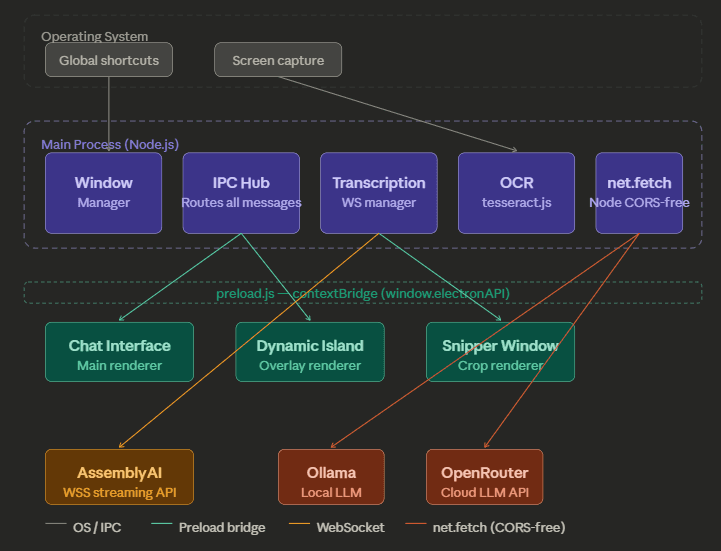
IPC Communication Patterns
Mechanism: ipcRenderer.invoke(channel, data)
Used for: AI chat queries, OCR results, model list fetching.
Mechanism: ipcRenderer.send(channel, data)
Used for: Audio chunk streaming, window state changes.
Mechanism: win.webContents.send(channel, data)
Used for: Live transcription text, screenshot delivery, settings sync.
2. Feature Deep-Dives
The Stealth Mode UI System
Create a UI that floats above everything, doesn't show up in screen sharing, and hides from the taskbar.
Window Creation
The Main Process creates a BrowserWindow with transparent: true, frame: false, and skipTaskbar: true. This makes the window completely invisible in system UI — no title bar, no taskbar entry.
Z-Order Pinning
win.setAlwaysOnTop(true, 'screen-saver') pins the window at the screen-saver z-level — above almost every other OS element, including fullscreen applications.
Content Protection (DRM)
win.setContentProtection(true) leverages OS-level DRM to prevent screen recording tools (OBS, Teams, Zoom) from seeing the window. It renders as a black rectangle to capture APIs.
Glassmorphism Layer
With opacity: 0.9 and CSS backdrop-filter: blur(), the window blends into whatever is behind it as a floating glass panel.
Screen Snipping & OCR Pipeline
Let the user draw a box on the screen, capture the text inside it, and insert it into the prompt.
Global Shortcut Trigger
User presses Ctrl+Shift+S. The Main Process intercepts via globalShortcut.register().
Desktop Capture
Main Process uses desktopCapturer.getSources() to take a full-screen screenshot as a NativeImage buffer.
Region Selection
The user draws a rectangle on the frozen screenshot overlay. The Snipper captures coordinates (x, y, w, h).
Crop & OCR
Main Process crops the original screenshot then feeds the pixel buffer to tesseract.js which runs entirely locally.
Text Delivery
Extracted text is sent via IPC to the Chat Renderer and auto-appended to the prompt textarea.
Real-Time Voice Transcription
Capture system audio, stream it to AssemblyAI for live transcription, and display rolling text in the Dynamic Island overlay.
Audio Capture
Renderer uses navigator.mediaDevices.getDisplayMedia({ audio: true }) to capture speaker output directly.
AudioWorklet Processing
Raw audio is piped into a custom AudioWorkletProcessor that buffers 100ms of 16kHz mono PCM samples.
IPC Relay
The Worklet posts base64-encoded audio chunks to the Renderer, which relays them to Main Process via ipcRenderer.send('audio-chunk').
WebSocket to AssemblyAI
Main Process manages a persistent WSS connection to AssemblyAI's Streaming API. Audio chunks are funneled into the socket.
Dual-Window Broadcast
Finalized transcription JSON is broadcast to both the Chat Window and the Dynamic Island Window via webContents.send().
Multi-Provider AI Orchestration
Query local models (Ollama) or cloud models (OpenRouter) seamlessly, enriched with contextual data.
Context Assembly
Renderer pulls Persona, System Prompt, Resume, and Job Description from LocalStorage and merges them into a hidden system message.
Provider Selection
The UI determines whether to hit Ollama (fully local) or OpenRouter (cloud) based on user settings.
CORS-Free Fetch
Main Process uses native net.fetch() to perform Node.js network calls that bypass all browser CORS policies.
Response Delivery
The AI response (Markdown) is pushed back to the Renderer and rendered with GFM support and syntax highlighting.
3. Window Lifecycle Management
| Window | Created | Lifetime | DRM | Z-Order |
|---|---|---|---|---|
| Chat (Main) | App boot | Persistent | YES | screen-saver level |
| Dynamic Island | App boot | Persistent | YES | screen-saver level |
| Snipper | On shortcut | Ephemeral | NO | Fullscreen |
4. Security Model
Renderers cannot access Node.js. All OS interactions go through hard-coded IPC channels in preload.js.
Personas, resumes, API keys, and history are stored in browser LocalStorage. No telemetry or analytics.
Only user-configured LLM and optional transcription connections exist. No phantom outbound traffic.
No disk-level session persistence beyond explicit data. memory state is destroyed on app close.
5. Challenges & Solutions
Silent crashes on API failures or network timeouts▼
WebSocket connections to AssemblyAI randomly dropping or hanging▼
CORS errors when calling OpenRouter/Ollama from the UI▼
White screen on high load (Render Process Gone)▼
AssemblyAI Error 3007: Input Duration Violation▼
6. Contributing
Imposter is open source. Here's how to get started: